- Feb 25
Reoon Email Verifier - Deep Dive Review
- James Pratt | Founder & CEO
- AI Tool Reviews (AppSumo)
Want to know where to start with AI?
Get a clear first map before choosing tools, training, or implementation.
The Practical AI Snapshot helps identify safe opportunities, areas that need care, and the first practical priorities.
You leave with a short report and a recommended next step.
Review #1 | JamesPratt.com Deep Dive Series
Author: James Pratt | Founder & CEO
Published: 25 February 2026
—
Disclosure & Scope
AFFILIATE DISCLOSURE: This post contains affiliate links and may reference tools the author uses or recommends. If you purchase through these links, a commission may be earned at no extra cost to you. Only tools that are genuinely useful for building sustainable, values-led businesses are shared.
REVIEW SCOPE: This review reflects Reoon Email Verifier’s state at time of writing (February 2026). Features, pricing, integrations, and deals such as the AppSumo lifetime offer change frequently. Treat all numbers as indicative only and verify current details on Reoon’s website and AppSumo page before purchasing.
—
Executive Summary
Key Verdict: PILOT - worth testing in a controlled trial before committing at scale.
Reoon Email Verifier is a low-cost, high-utility infrastructure tool for cleaning email lists, reducing bounce rates, and protecting sender reputation. It is not the most polished or compliance-heavy platform in the market, but the combination of strong core verification, extremely competitive pricing, and the AppSumo lifetime deal makes it a serious contender - especially for Pacific and Māori entrepreneurs, agencies, and SMEs who need to stretch every dollar.
Best for
Agencies and service providers running cold email outreach and lead generation at scale (1,000+ emails/month) who want to reduce bounces without expensive monthly subscriptions.
SaaS, e-commerce, and education ventures cleaning existing databases and verifying new leads as they come in, especially where Make.com or WordPress are already in use.
Not for
Organisations that require SOC 2, ISO 27001, or a signed Data Processing Agreement (DPA) for all vendors - Reoon does not currently provide these.
Teams that depend on deep native CRM integrations (HubSpot, Salesforce, Pipedrive) or Zapier-first workflows - Reoon’s integrations are comparatively limited.
Very low-volume senders (less than 100 emails/month) who can rely on manual checks or the free tier.
Biggest benefit: Reoon delivers enterprise-style email verification (syntax, domain, inbox existence, disposable detection) at a fraction of the cost of better-known competitors, with AppSumo tiers effectively reducing per-email cost well below market rates.
Biggest risk: Material governance gaps - no published uptime SLA, no SOC 2 certification, no signed DPA, and support response times of 3–8 days reported by multiple users.
Setup friction: Low. The dashboard is straightforward, bulk upload is drag-and-drop, and the API is a simple web request that most developers can wire up in a few hours.
Recommendation: Treat Reoon as a pilot candidate. Start with a small, known list and benchmark accuracy against your current tool or ESP. If it matches or outperforms your baseline - and the governance profile is acceptable for your organisation - consider locking in the AppSumo lifetime deal.
Next step (quick win): Sign up for the free tier (100 lifetime credits plus 20 daily) and run 100–200 mixed addresses (valid, invalid, old) through Reoon. This gives you a no-cost feel for accuracy, speed, and usability before you spend anything.
—
What It Does (Plain Language)
In simple terms, Reoon Email Verifier checks whether an email address is likely to work before you send to it. Invalid emails create bounces, and repeated bounces damage your sender reputation - making all your emails, even to good contacts, more likely to land in spam.
Core Use Cases
Cold outreach: Clean prospect lists before sending campaigns so you avoid hard bounces and domain blacklisting.
Lead capture: Verify emails as people sign up through web forms, so you keep fake or disposable addresses out of your database.
Database hygiene: Run regular clean-ups on existing customer or subscriber lists to remove invalid or risky emails that build up over time.
Agency services: Add verification as a step in client campaign setup to improve performance and reduce complaints about deliverability.
Who Built It
Reoon Email Verifier is built by Reoon Technology, a small technology company founded in 2018 and based in Sylhet, Bangladesh. The founder, Md Farhanul Islam, is a software engineer with an engineering background and experience in Japanese corporate environments. The company reports a team of roughly 11–50 people and serves thousands of users globally.
Across review platforms, Reoon holds strong ratings: a 4.9/5 average rating is reported on its own site; G2 lists 1,000+ reviews with a high satisfaction score; Trustpilot lists around 75 reviews with a positive overall rating.
Key Stats (At Time of Writing)
Claimed accuracy: 99%+ for verified lists.
Bulk limit: Up to 50,000 emails per bulk verification task.
Free tier: 100 verification credits plus 20 daily credits, at no cost.
API response: Quick mode responds in around 0.5 seconds per email.
AppSumo deal: One-time payment from USD $79 for lifetime access, with daily and bonus credits included.
As always, verify current stats and pricing with Reoon and AppSumo before making decisions.
—
Architecture & How It Works
You do not need to be technical to use Reoon, but understanding the basics of how it works will help you assess risk and reliability.
The Verification Pipeline
Reoon runs each email address through a pipeline of checks, moving from simple to more advanced.
Format check (syntax): It first checks that the email is written correctly - for example,
name@example.cominstead ofname@exampleorname@.com. This step removes obviously invalid addresses quickly.Domain and server check: Reoon looks up the domain (the part after
@) and confirms that it exists, that it has mail records (MX records), and that there is a mail server configured to receive email.Inbox-level check: In its deeper mode, Reoon talks to the mail server and asks, in effect, “Does this inbox exist and can it receive mail?” This is done using the same protocol email servers use to talk to each other (SMTP), but no real email is sent, so the contact never sees a test message.
Risk checks: Reoon checks whether the address looks like a disposable or temporary email (often used for one-off sign-ups), whether it is a role-based address like
info@orsupport@, and whether the domain is known as a “catch-all” that says “yes” to everything.Classification: Finally, it classifies each email as safe, risky, invalid, or unknown. You can then decide which categories to keep or remove.
Reoon offers two modes: Quick (fast, lighter checks, suitable for real-time form validation) and Power (slower, deeper checks, used for bulk cleaning and the most accurate results).
Infrastructure: Where Your Data Goes
Reoon processes data on servers located in the United States and the European Union. Data is encrypted on the servers using AES-256, a standard used widely for protecting sensitive information. According to the privacy policy, verification data is automatically deleted after around 15 days, and users can manually delete data earlier through the dashboard.
There is no published uptime Service Level Agreement (SLA), and Reoon does not disclose its underlying cloud provider. For most small businesses this may be acceptable, but for organisations with strict service-level requirements it is a material governance gap.
Key Dependencies and Single Points of Failure
Reoon runs its own verification infrastructure rather than relying on third-party email verification APIs. It uses “well-configured servers with a lot of IP addresses” to talk to large providers like Microsoft, Gmail, and Yahoo, which can be harder to verify reliably.
This gives Reoon control over its engine, but it also concentrates risk:
All verification depends on Reoon’s own servers and IP reputation.
All operations, development, and support are based in Bangladesh, and the company has acknowledged that political events there in 2024 caused disruptions to support (“the current dark days of Bangladesh”).
For Pacific and Māori entrepreneurs, this means Reoon can be a powerful, low-cost tool - but it should not be treated as mission-critical infrastructure without a contingency plan.
—
Feature Set Evaluation
Strengths: What Works Well
1. Strong Bulk Verification at Low Cost
Reoon’s bulk verification supports up to 50,000 emails per task, with users reporting that lists of around 900 emails can be processed in a few minutes. For agencies and SMEs, this means you can clean large lists overnight without needing enterprise budgets.
2. Clear, Granular Results
Verification results are returned with detailed flags such as safe, risky, invalid, disposable, role-based, catch-all, inbox full, and disabled accounts. This allows more nuanced decisions - for example, keeping some “risky” addresses for one last attempt while excluding clear invalids and disposables.
3. Simple but Capable API
The REST API is straightforward: you send an email address and receive a structured response that can be plugged into your CRM or automation tool. Quick mode supports near real-time checks (around 0.5 seconds) for forms and sign-ups, while Power mode delivers deeper checks for batch jobs.
4. WordPress Plugin and No-Code Integrations
For many small businesses, WordPress is the main online presence. Reoon’s plugin integrates with major form builders (Contact Form 7, Gravity Forms, WPForms, Elementor, Ninja Forms, WooCommerce checkout, and default registration forms), making it easy to block fake or disposable addresses at the front door. There is also a direct integration with Make.com and other no-code platforms like Pabbly and Albato.
5. Exceptional Value via AppSumo Deal
The AppSumo lifetime deal combines a one-time bonus pool of credits with daily renewal credits, effectively giving ongoing verification capacity forever for a single upfront payment. When compared to mainstream tools that charge USD $40–$80 per 10,000 verifications, Reoon’s effective cost per email is significantly lower.
Weaknesses: Critical Gaps
1. Limited Native Integrations and No Webhooks
Reoon’s native integration list is short. There is no first-class Zapier app, no direct connectors for mainstream CRMs, and no webhook support - everything is done by calling the API or using Make.com/Pabbly as a bridge. This is workable, but it adds friction compared to competitors with “one-click” integrations.
2. No Published Uptime SLA or Security Certifications
There is no public uptime SLA, status page, SOC 2 report, or ISO 27001 certification. For governance-conscious organisations, especially those serving government, health, or financial services, this is a significant gap that may rule Reoon out as a core vendor.
3. Data Protection Documentation is Thin
Reoon states that it is GDPR-compliant and outlines user rights in its privacy policy, but it does not offer a signed DPA and does not provide independent verification of compliance. For businesses in the EU or New Zealand, this creates extra legal work to ensure cross-border transfers and vendor obligations are covered.
4. Support Delays and Single-Time-Zone Coverage
Multiple reviews mention support tickets taking 3–8 days to receive a response. The team operates from a single country and time zone, and there is no phone support or documented escalation path. If verification issues arise during a critical campaign, you may need to rely on your own workarounds.
5. Spam Trap and Catch-All Accuracy Limits
Reoon can only detect known or signature-based spam traps, and at least one agency user reported both missed traps and legitimate business emails being flagged incorrectly. Catch-all detection is intentionally conservative - reducing false alarms but leaving more addresses in the “risky” bucket for you to decide on.
These gaps do not make Reoon unusable, but they are material governance concerns that should be considered alongside the attractive pricing.
—
Use Cases (Micro + SME)
1. Solo Consultant Doing Cold Outreach
A solo consultant building relationships with Pacific and Māori businesses sends around 300–500 cold emails each month. Before each campaign, they upload the prospect list to Reoon, run a Power-mode verification, and remove all invalid and disposable addresses. If the consultant was previously seeing 5–10% bounce rates, a clean list might reduce this to under 2%, improving deliverability and reducing the risk of domain blacklisting. For a one-time USD $79 spend, this easily pays for itself over a year of campaigns.
2. 10-Person SaaS or Service Business
A small SaaS or digital service team collects 2,000–3,000 leads per month through webinars, downloads, and trials. They add Reoon into their Make.com workflows so that every new lead is checked before entering the CRM. Invalid and disposable emails are diverted to a review list; safe addresses flow through as normal. Over time, this reduces email service provider (ESP) costs (fewer dead contacts) and produces more accurate conversion and engagement metrics.
3. Agency Offering List Cleaning or Lead Gen
An agency working with multiple clients stacks two or three AppSumo codes. This gives them a sizable pool of lifetime credits plus daily renewals they can use to verify clients’ lists as part of their engagement. They position list verification as a standard, non-negotiable part of every campaign. Clients see lower bounce rates and better deliverability, while the agency absorbs only a small marginal cost.
—
Implementation Plan
First 60 Minutes
Sign up for a free Reoon account and confirm email verification.
Explore the dashboard - locate the bulk upload area, history/logs, and API settings.
Prepare a test CSV of 100–500 email addresses including known valid, known invalid, and “unknown” contacts.
Upload the test list and select Power mode for the deepest verification.
Run verification and wait for processing to complete.
Download the results and review the classifications - compare Reoon’s judgment against what you already know about these addresses.
Calculate rough accuracy based on your sample: how many obviously valid addresses did it mark as safe, and how many did it mark incorrectly?
Generate an API key in the settings page if you plan to integrate with Make.com or custom code.
Run a single-email API test using a tool like Postman, Insomnia, or a simple script, so your developer (or you) understands the response format.
First 7 Days
Over the first week, treat Reoon as a trial.
-
Day 1–2
Test larger batches (1,000+ emails) and measure processing time.
Compare bounce rates between a campaign using a cleaned list and one using unverified addresses.
-
Day 3–5
Integrate Reoon into one workflow (e.g., WordPress forms or Make.com pipeline). Monitor for any failed checks or delays.
-
Day 6–7
Review credit usage, cost per verified email (using free credits or AppSumo code), and whether the operational effort (uploading, checking, integrating) is manageable.
Red flags to watch for
More than 3% of your clearly valid addresses marked as invalid.
Noticeable delays or timeouts during verification.
Integration failures that cause leads to be dropped or not verified.
Support tickets going unanswered beyond 72 hours when issues arise.
Decision point (end of Week 1): If accuracy is acceptable, workflows are stable, and the governance profile fits your risk appetite, proceed to purchase or stack AppSumo codes. If not, test an alternative such as NeverBounce or ZeroBounce with the same sample list.
—
Pricing & Commercial Model
Regular Pricing (Reoon Website, At Time of Writing)
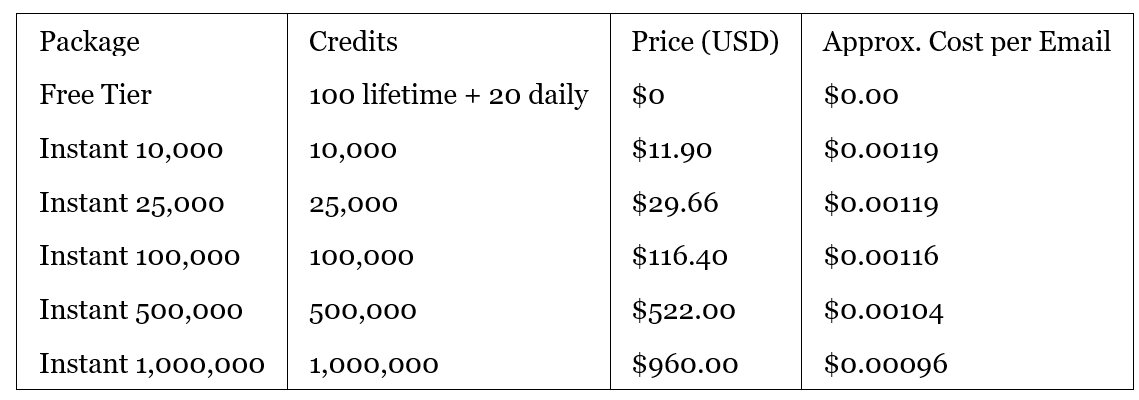
Source: Reoon website, at time of writing.
AppSumo Lifetime Deal (At Time of Writing)
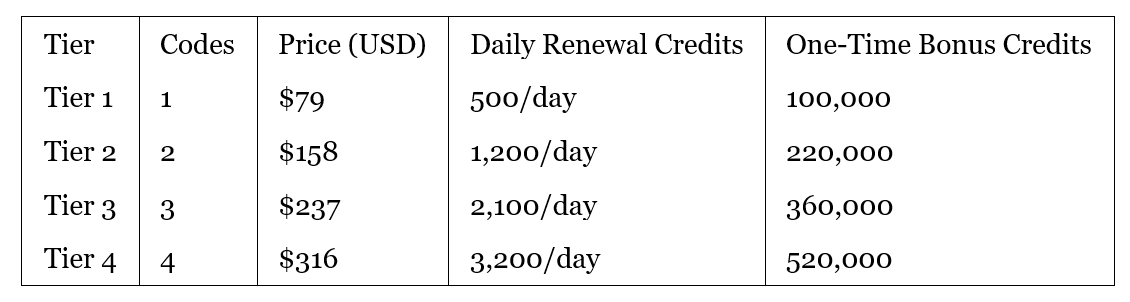
Sources: AppSumo listing and independent deal reviews, at time of writing. All tiers include lifetime access, API access, use on unlimited websites, and a 60-day refund period.
Hidden Costs & Considerations
Credits are consumed per verification attempt - you pay for checking an address, whether it is valid or invalid. Credits are usually refunded only for “unknown” results.
Additional credits beyond the AppSumo allocation can be purchased directly from Reoon. Pricing for these may change; verify current rates on Reoon’s website.
No separate setup or integration fee, but technical time is required if you plan to integrate the API into deeper workflows.
Currency and tax: Prices are in USD; factor in exchange rates and any applicable GST/VAT in your jurisdiction.
Always verify pricing on Reoon’s website and AppSumo listing before purchasing.
—
Governance, Risk & Privacy
For many Indigenous and values-led businesses, governance is not a tick-box exercise - it is about protecting people, relationships, and reputation. Reoon’s pricing is attractive, but there are real governance questions that need attention.
Critical Risks (With Priority)
1. Operational Concentration (HIGH)
Reoon is a small company (around 11–50 staff) based in a single country, Bangladesh. All development, operations, and support depend on this one organisation and its local environment. A support response referencing “the current dark days of Bangladesh” confirms that political events in 2024 disrupted operations and slowed response times. This is not theoretical - it has already affected users.
Mitigation: Treat Reoon as one component in your stack, not the only gatekeeper. Maintain the ability to switch to another verifier if needed, and avoid structuring your business so that you cannot send critical communications without Reoon.
2. Data Governance and Cross-Border Transfers (HIGH)
Reoon stores and processes data on servers in the United States and European Union. For New Zealand organisations, this is considered a cross-border transfer of personal information under the Privacy Act 2020. While Reoon states it is GDPR-compliant and outlines user rights, it does not provide a signed Data Processing Agreement or third-party certification.
Mitigation: Treat Reoon as a processor of email addresses only and avoid sending any additional personal data fields. Seek legal advice on whether Reoon’s contractual terms and privacy policy meet your obligations under the NZ Privacy Act and, where relevant, EU GDPR.
3. Lack of Formal Security and Compliance Certifications (MEDIUM–HIGH)
Reoon does not hold SOC 2, ISO 27001, or similar certifications, and is not typically listed among SOC 2-compliant email vendors highlighted by independent security reviewers. There is also no public security whitepaper or detailed documentation of internal controls.
Mitigation: For businesses with strict security requirements, this may be a hard stop. For smaller businesses, consider limiting the data you send (email addresses only), rotating API keys regularly, and reviewing access controls within your team.
4. Support Reliability and Time Zones (MEDIUM)
Support is primarily via email, with no published SLA, no phone support, and no clear escalation path. Several users report response times between 3–8 days, particularly around the 2024 disruptions.
Mitigation: Do not assume you will get urgent help during a crisis. Build internal capability (or work with an external technical partner) who can adjust your workflows, pause verifications, or switch to an alternative if Reoon is unavailable.
5. Accuracy Variance for Edge Cases (MEDIUM)
While everyday accuracy appears strong, users report limitations in spam trap detection and occasional false positives for legitimate business addresses. Catch-all domains and older, stale lists are naturally harder to verify, and no tool is perfect.
Mitigation: Use Reoon as a filter, not as a judge of last resort. For high-value contacts, consider manual review of “risky” addresses before deleting them. Compare performance with another verifier on a small subset if you have doubts.
6. Vendor Longevity and Lifetime Deal Risk (LOW–MEDIUM)
Lifetime deals always carry the risk that the vendor may change plans later, restrict features, or, in the worst case, cease operations. Reoon is privately held with no published financials.
Mitigation: Treat a lifetime deal as a way to reduce cost, not as a guarantee that nothing will ever change. Make sure your processes can be adapted if pricing or access shifts in future.
Privacy & Data Handling
According to Reoon’s privacy policy and documentation:
Data storage: Email data is stored on servers in the US and EU, using AES-256 encryption.
Data retention: Verification data is automatically deleted after around 15 days; users can delete data earlier via the dashboard.
Data sharing: Reoon states it does not sell or share your verification data with third parties.
User rights: The policy references rights aligned with GDPR (access, rectification, deletion, restriction, objection).
However, there is no explicit reference to the New Zealand Privacy Act 2020 or its 13 Information Privacy Principles. NZ businesses remain responsible for ensuring any offshore processor provides comparable safeguards.
Compliance gaps:
No signed DPA available as standard.
No SOC 2, ISO 27001, or similar certifications.
No documented New Zealand or Pacific-focused data protection commitments.
This review does not constitute legal or compliance advice. Consult your legal team or privacy advisor before processing sensitive data through any third-party email verification service.
—
Competitive Landscape & Alternatives
Reoon sits in a crowded market of email verification tools. Its main differentiator is price and the unique AppSumo lifetime deal; it does not aim to be the most integrated or compliance-heavy option.
Key Competitors
NeverBounce: Well-known for strong accuracy and stability, with pay-as-you-go pricing and a long track record serving agencies and larger senders.
ZeroBounce: Offers email verification plus richer features like activity data and scoring, alongside an extensive integration marketplace (dozens of native connectors).
Hunter.io: Primarily an email finder tool with built-in verification. Best suited when you want to both discover and verify emails in one platform.
Bouncer: European-based verifier with a strong focus on GDPR and competitive pricing.
EmailListVerify: Budget verifier with low per-email costs for high-volume cleaning.
Feature Comparison (At Time of Writing)
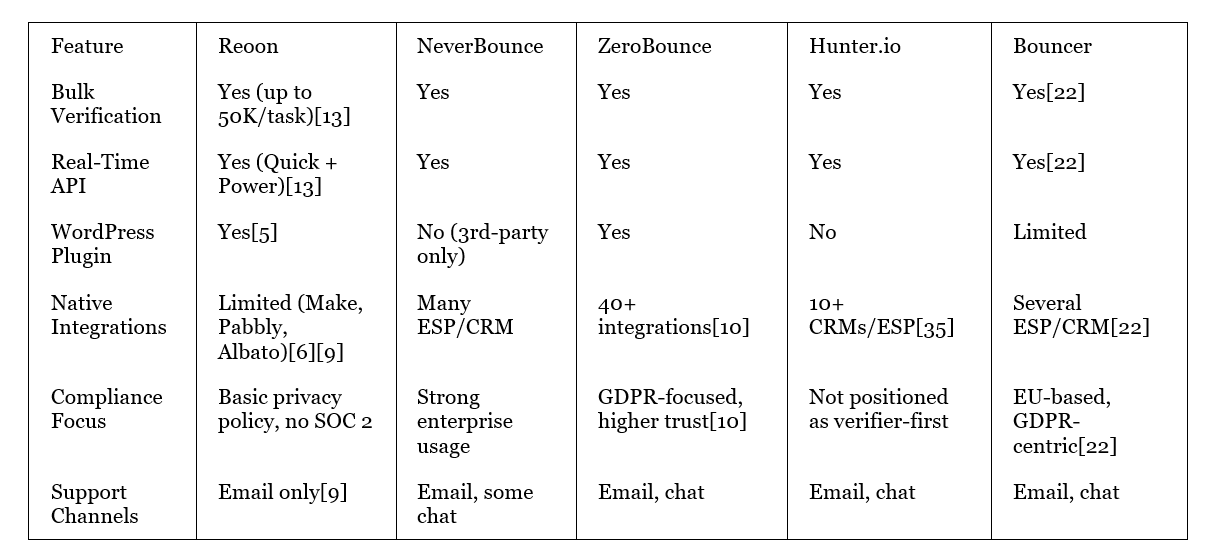
Pricing Comparison (Approximate, At Time of Writing)
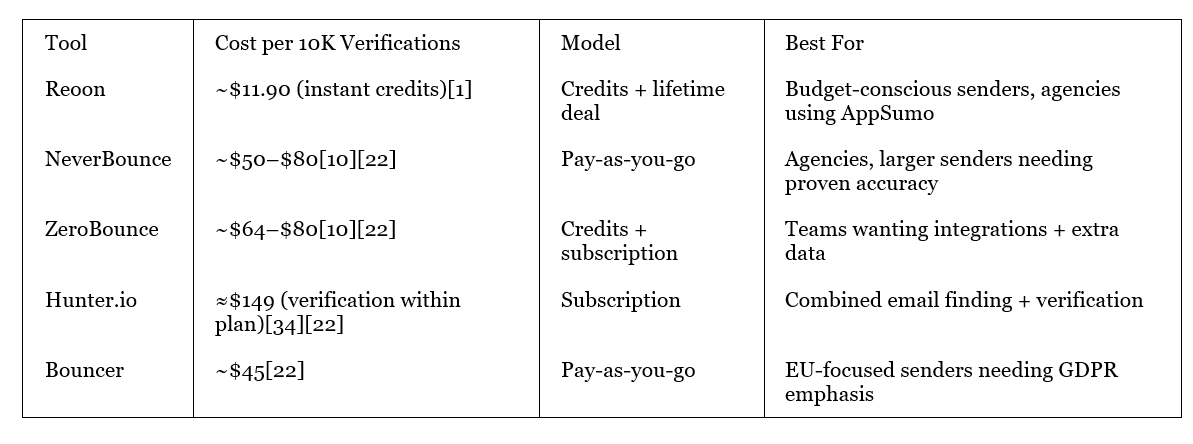
Market Positioning
Reoon occupies the budget-leader position: strong verification fundamentals at very low prices, but with fewer integrations and weaker formal governance documentation than more expensive competitors. For many Indigenous, Pacific, and Māori-led businesses, this trade-off can make sense if the risks are consciously managed rather than ignored.
—
Recommendation & Next Steps
Go/No-Go Decision Framework
✅ PROCEED IF
You send 1,000+ emails per month (cold outreach, newsletters, customer campaigns) and want to protect deliverability.
Your business or agency can accept a vendor without SOC 2 and without a signed DPA, provided email addresses are the only data processed.
Your stack already includes WordPress or Make.com, or you are comfortable using a REST API.
You are looking for a low-cost way to introduce or improve list hygiene without adding big monthly subscriptions.
You are willing to run a structured trial and compare performance against a second verifier if needed.
❌ HALT IF
Your organisation or clients require SOC 2, ISO 27001, or formal DPAs with all vendors.
You need guaranteed response times, phone support, or 24/7 coverage during campaigns.
You rely heavily on Zapier and expect a native “plug-and-play” integration.
Your email volumes are small (under 100 per month) and you can manage lists manually or with your ESP’s built-in tools.
You prefer a single vendor for both finding and verifying emails (in which case Hunter.io or similar may be more convenient).
Phased Implementation Roadmap
Phase 1 - Pilot (Week 1)
Sign up for the free tier.
Run 500–1,000 mixed addresses (known valid/invalid) through Reoon.
Compare results with your current bounce data or another verifier.
Decide whether accuracy and ease-of-use meet your baseline.
Phase 2 - Integration (Weeks 2–3)
If the pilot is positive, purchase one AppSumo code and activate it on your main account.
Integrate Reoon into one live workflow (e.g., lead capture forms via WordPress or Make.com automation).
Monitor for any issues with lead flow, verification delays, or credit consumption.
Phase 3 - Scale (Week 4 and Beyond)
Extend verification to all key campaigns and intake points (newsletters, onboarding, event registrations).
Consider stacking extra AppSumo codes if you run multiple brands or an agency model.
Set a quarterly review to check bounce rate trends, cost per verified email, and whether governance requirements have changed.
—
Final Verdict
For Pacific and Māori entrepreneurs, agencies, and SMEs who need to get serious about email deliverability without adding big monthly costs, Reoon Email Verifier is a pragmatic, high-value option to pilot. It offers core verification capabilities comparable to more expensive tools, at a price point that is difficult to ignore.
The trade-off is clear: strong value and functionality on one side, and governance gaps (no SOC 2, no DPA, slower support) on the other. If those risks are understood and managed - and if email addresses are the only data shared - Reoon can be a powerful part of your email infrastructure stack.
—
Ready To Implement This?
If you are ready to tidy up your email infrastructure and reclaim your time:
Start with the toolkit: Begin with the Save 10 Hours a Week with AI (Small Business Quick Start) toolkit for USD $9.99 - a practical system for choosing and setting up AI and automation tools like Reoon in your business.
Trial Reoon: If Reoon feels like the right fit, consider the Reoon Email Verifier AppSumo Lifetime Deal (affiliate link) to lock in low, one-time pricing.
Design the full stack: When you are ready to map your full email and automation stack, explore the AI Ladder to book an AI Systems Consult or Done-for-You implementation.
Ngā mihi nui and fa’afetai lava - may your emails land where they are meant to.
Not sure where to start?
That is completely normal
The AI space can feel noisy when you are trying to decide between learning, planning, governance, implementation, and support.
The AI Ladder helps you choose the right next step based on your context, readiness, and capacity.
Start small. Prove value. Scale what works.